
Online TV Player
Basic 4.96
Size: 1.64 MB
Downloads: 9740
Platform: Win98,WinME,WinNT 4.x,Windows2000,WinXP,Windows2003,Windows Vista Starter,Windows Vista Home Basic,Windows Vista Home Premium,Windows Vista Business,Windows Vista Enterprise,Windows Vista Ultimate,Windows Vista Home Basic x64,Windows Vista Home Premium x6

Nowadays, television is a key part of everyone's lives. It has developed continuously during the past years and now, everybody has at least two TV sets in his home. The problem with TV sets is that they are old fashioned and take up a lot of space, even if we are talking about the latest LCD TVs. Also, to watch television programs, you would need a cable subscription, that involves a lot of wiring throughout the house. Besides that, some cable companies don't have in their program list all the channels you want to watch, even if you pay big money for the most complete subscription. In this case, a good choice would be watching online television on your computer. It's fast, it's easier, it's more convenient and best of all, it's free. No more expensive subscriptions for the channels that you don't want. A software that allows you to watch online TV for free is Online TV Player.
The software installs in a flash and requires less than average system resources. Takes up little disk space, around 6 MB and can be run on most versions of Windows, from XP to Windows 7. Some channels require Windows Media Player or RealPlayer to work, so these two programs should be installed prior to using the software
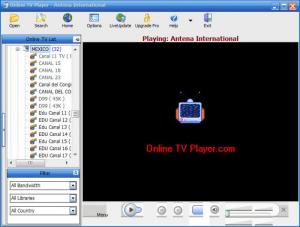
The interface couldn't be more simple. It's split into two sections, the left displaying all the channel in a tree view and the right showing the video feed. The number of radio and TV channels is quite impressive and covers stations from all around the world. Channels are grouped according to the country's name, for easily and quickly finding the desired channel. Preferred channels can be added to favorites, to simplify finding them later. Also, channels can be filtered by bandwidth, by type or by country.
The interface supports various skins that can be changed from the Options window. Also, user's channels can be added manually by simply typing their address. The list of channel is updated and verified periodically so the user won't end up with broken links or unplayable stations. The quality for most of the channels is generally good and it's ideal for full-screen playback.
Pros
Includes a huge list of TV and radio channel from across the world. Also, all the channels are organized by the name of their country, thus being very easy to find a desired station.

Cons
The program lacks complex features that advanced users may need. Online TV Player is the ideal software for online TV playback, featuring channels from all around the world.

Online TV Player
Basic 4.96
Download
Online TV Player Awards

Online TV Player Editor’s Review Rating
Online TV Player has been reviewed by Jerome Johnston on 19 Dec 2011. Based on the user interface, features and complexity, Findmysoft has rated Online TV Player 5 out of 5 stars, naming it Essential







